
 Likes:
I think this only will work in your nuvi 55Originally Posted by dhana_vi

D3478140A.jcv Nuvi x0/x2&street pilot:LaneAssistTemplatePortrait Splitscreen Template jcv USA CAN only - 1 RAR archives, unpacked size 123.995.348 bytes
Code:Please Login or Register to see the links
Welcome guest, is this your first visit? Click the "Create Account" button now to join.


Results 81 to 90 of 116
-
23rd December 2014, 01:47 AM #81Junior Member


- Join Date
- Dec 2014
- Location
- Jakarta,Indonesia
- Age
- 39
- Posts
- 5
- Rep Power
- 0

thanks catymag.
I tried and I think its not working, may I know if my file and folders are correct?
img file: Computer\nüvi 55\Internal Storage\Map\City Navigator North America NT 2015.3.img
JCV file: Computer\nüvi 55\Internal Storage\Garmin\JCV\D3836110A.JCV
or there are any files that I'm missing? my Garmin is 55 LM and localized in Indonesia.
-
23rd December 2014, 02:51 AM #82Important User


- Join Date
- Nov 2007
- Location
- light side
- Posts
- 15,182
- Rep Power
- 5128

You have to navigate to get to the good.
Galaxy S5 Kitkat 4.4.2 / Nuvi1200->1250 / Nuvi3790T->34xx / Nuvi 2200 / Nuvi 66 / Oregon 600
-
23rd December 2014, 06:26 PM #83Junior Member
- Join Date
- Dec 2014
- Location
- There
- Posts
- 4
- Rep Power
- 0
Sorry, how could I realise what is the correct JCV version for 2015.30 map used into my Nuvi 2797lmt?
Thanks in advance.
-
23rd December 2014, 06:58 PM #84Junior Member
- Join Date
- Dec 2014
- Location
- Jakarta,Indonesia
- Age
- 39
- Posts
- 5
- Rep Power
- 0
its still not working...
 any other ideas?
-
23rd December 2014, 10:18 PM #85Garmin/GPS Systems GMod.


- Join Date
- Aug 2011
- Location
- Oz.
- Posts
- 6,813
- Rep Power
- 2568
From Post #1: Originally Posted by vasco1td
Will suit all 2xxx/3xxx in fact.D3191150A.JCV SplitScreen Full version Nuvi 24xx 25xx - 2 RAR archives, unpacked size 501.828.745 bytes
It's the correct file. The D3478140A.jcv suits not only nuvi 4x/5x as indicated in the initial post but all xx series including your 55. Check placement is correct. Either in card:/Garmin/JCV/*.jcv or in unit:/.System/JCV/*.jcv. Originally Posted by dhana_vi
That file is less than a quarter of the size of the big splitscreen for 2/3xxx and has very few views in comparison. Put the unit in simulation mode, then simulate a route from the center of New York City [select NYC as the location from Where To?>Towns>Spell option>Set Location. Then do the same for Buffalo NY as a destination. Scroll thru the route, when you see the greyed out words 'Junction View' become bright press on them and you'll see the JV.
NB: The above is for simulation in a nuvi x0/x2, it may be more like a 2xxx in your 55 where you don't have any 'Junction View' words at the base of the screen to press and the split view JC shows automatically.Last edited by Neil; 23rd December 2014 at 10:36 PM.
'Thanking Posts' are banned. To thank someone, and/or to see hidden links and content, use the [Only registered and activated users can see links. ] button below left of the helpful post then refresh your browser [F5 key]. 'Thanking Posts' are banned.
Please don't spam. Posts serving no purpose other than to thank or to ask about hidden links are trashed or deleted, it's GPSPower's policy under [Only registered and activated users can see links. ]. Please don't spam.
[Only registered and activated users can see links. ] should make their first post as a new Intro Thread in [Only registered and activated users can see links. ].
-
23rd December 2014, 10:42 PM #86Junior Member
- Join Date
- Sep 2014
- Location
- TX
- Age
- 43
- Posts
- 3
- Rep Power
- 0
Thanks for the suggestion! Originally Posted by smokefree
To eliminate this as an error source, I went with the official Garmin update for my Kenwood DNX7100.
Still had the same problem, until I went back and read the map-update instructions:
-I updated the Kenwood Firmware via USB in the back (
-I updated the Garmin software via SD card reader in the front, using a 2GB SD-card (not SDHC, must be <=2GB) :Code:Please Login or Register to see the links
Code:Please Login or Register to see the links
-New map works now...
Changes made from version 2.80 to 2.90:
Added support for high-density SD cards to handle future map updates.
Last edited by Neil; 23rd December 2014 at 11:11 PM. Reason: Coded links [please code all outside links as per Rules to prevent refbacks. ;)
-
24th December 2014, 11:25 PM #87Master


- Join Date
- Jun 2011
- Location
- USA
- Posts
- 77
- Rep Power
- 48
OK, usually I get the img files. Now I tried the MapSource files from the first post. It says to unlock with "Protected Garmin Toolkit"... OK.
In there under the tab "MapSource" I unlocked the TBD file associated with CN NA 2015.30.
But when I start the BaseCamp, it still says it is locked...
What am I doing wrong?
LE: After I unlocked the TBD file before installation on PC (not after), it worked.Last edited by Superduper67; 24th December 2014 at 11:34 PM.
-
7th January 2015, 09:44 PM #88Garmin/GPS Systems GMod.
- Join Date
- Aug 2011
- Location
- Oz.
- Posts
- 6,813
- Rep Power
- 2568
 Full North America US/CA/MX Locked Image from original device
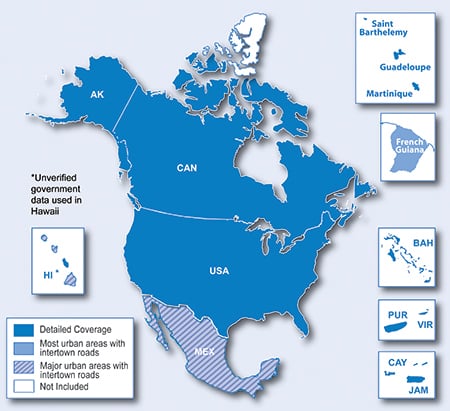
Spoiler: Full NA Locked Original Image'Thanking Posts' are banned. To thank someone, and/or to see hidden links and content, use the [Only registered and activated users can see links. ] button below left of the helpful post then refresh your browser [F5 key]. 'Thanking Posts' are banned.
Please don't spam. Posts serving no purpose other than to thank or to ask about hidden links are trashed or deleted, it's GPSPower's policy under [Only registered and activated users can see links. ]. Please don't spam.
[Only registered and activated users can see links. ] should make their first post as a new Intro Thread in [Only registered and activated users can see links. ].
-
10th January 2015, 05:46 PM #89Junior Member
- Join Date
- Jan 2015
- Location
- Taiwan
- Posts
- 4
- Rep Power
- 0
Hello,
May I know how to install "Garmin City Navigator North America NT 2015.30 " on Garmin 1470T or SD card?
It seems that it can be only installed on PC.
Do I make any mistakes?
Thanks
-
10th January 2015, 05:53 PM #90Important User
- Join Date
- Nov 2007
- Location
- light side
- Posts
- 15,182
- Rep Power
- 5128
You have to navigate to get to the good.
Galaxy S5 Kitkat 4.4.2 / Nuvi1200->1250 / Nuvi3790T->34xx / Nuvi 2200 / Nuvi 66 / Oregon 600


Bookmarks