
 Likes:
 Reply With Quote
More info:
Code:Please Login or Register to see the links
Welcome guest, is this your first visit? Click the "Create Account" button now to join.


Results 1 to 10 of 14
-
26th September 2014, 02:55 AM #1monterraGuest
 TOPO Australia & New Zealand Lite v.5
TOPO Australia & New Zealand Lite v.5
TOPO Australia & New Zealand Lite v.5
Get enhanced topographic detail on your compatible device whether you're in the outback or on a main boulevard in the city. This map provides a wide array of topographic information from terrain contours, elevations and summits to coverage of perennial and intermittent lakes, rivers and streams in Australia and New Zealand.
[Only registered and activated users can see links. ]
•Provides terrain contours and summit points at 40 m intervals for a more detailed view of the terrain
•Contains more than 105,000 km of tracks, roads and outback trails; also displays 4WD destinations and hydrographic features: lake/river shorelines and perennial and seasonal streams
•Shows national, state and local parks as well as parks and reserve areas
•Includes built-in DEM data with 3-D shading and route elevation profiles on compatible devices so you can estimate terrain difficulty
•Offers updated and new searchable points of interest in urban, rural and outback areas, including lodging, restaurants, homesteads, parks, camping locations and shopping
•Displays updated non-routable road content, by HERE, to give you turn-by-turn directions to your destination
Features digital topographic and street maps for all of Australia and New Zealand. Also includes expanded coverage for several New Zealand islands, including Antipodes, Auckland, Bounty, Campbell, Kermadec, Chatham, Lord Howe, Snares, Stewart and Three Kings.
[Only registered and activated users can see links. ]
locked
FID 3551
topo AusNz 5L_gmapsupp.rar - RAR archive, unpacked size 1.464.500.224 bytesCode:Please Login or Register to see the links
Download:
[Only registered and activated users can see links. ]
password:gpspower.net
-
26th September 2014, 09:41 AM #2Important User


- Join Date
- Sep 2010
- Location
- @ home
- Age
- 46
- Posts
- 956
- Rep Power
- 736

-
26th September 2014, 05:07 PM #3Master

- Join Date
- Jun 2006
- Location
- GPS Underground
- Age
- 20
- Posts
- 399
- Rep Power
- 422

So what does the LITE actually mean???


Last edited by Schermann; 2nd October 2014 at 05:12 PM.

-
26th September 2014, 05:07 PM #4pietuGuest
FID: 3551
Download:
Locked Image: [Only registered and activated users can see links. ] | [Only registered and activated users can see links. ] | [Only registered and activated users can see links. ]
UnLocked Image: [Only registered and activated users can see links. ] | [Only registered and activated users can see links. ] | [Only registered and activated users can see links. ]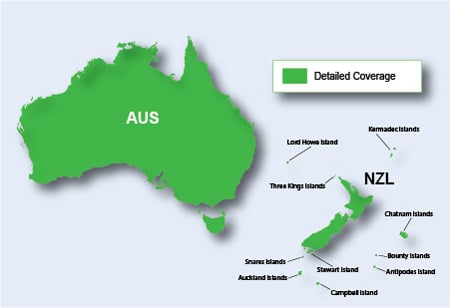
Code:Please Login or Register to see the links
Last edited by catymag; 27th September 2014 at 07:38 PM. Reason: removed already posted info
-
26th September 2014, 05:57 PM #5Navigation software expert


- Join Date
- Jan 2010
- Location
- on Earth
- Posts
- 332
- Rep Power
- 230
Download Instructions:
Spoiler: download
inside
unlocked image file
hoster
filefactory.com
share-online.biz
-
26th September 2014, 07:02 PM #6Master


- Join Date
- Jun 2009
- Location
- EU
- Posts
- 161
- Rep Power
- 113
There are some Topo Pro versions with ActiveRouting and the same map is there as a Light version without the Activerouting information. (Belux, Benelux, France, Germany etc.) Originally Posted by Schermann
I think that is the difference. And in this case Lite means the same as Light, or Garmin mislead us. Maybe a Topo Pro v5 with Activerouting is coming out ?
The link of Monterra workes for me, downloaded the file in 30 minutes. Originally Posted by Schermann
Often a Zippyshare-link takes a few minutes.
-
26th September 2014, 07:44 PM #7Important User
- Join Date
- Sep 2010
- Location
- @ home
- Age
- 46
- Posts
- 956
- Rep Power
- 736
I also downloaded the file from post #1 within 30 minutes. Originally Posted by Schermann

Originally Posted by Schermann
Topo AUS & NZ v4 (August 2012): gmapsupp.img size = 2,979,264 KB and contour lines each 10 m. Originally Posted by bommelb
Topo AUS & NZ v5 Lite (August 2014): gmapsupp.img size = 1,430,176 KB and contour lines each 40 m.
I think "Lite" here means more than just "no ActiveRouting", less contour lines or a compression rate more than twice as high...
-
27th September 2014, 02:15 AM #8Master

- Join Date
- Aug 2009
- Location
- Australia
- Posts
- 96
- Rep Power
- 74
Topo V4 is actually 20m contours. Originally Posted by smokefree
Apart from the size reduction benefits, having 40m contour interval in Aust is a bit pointless, we just don't have the elevation variation in most area's to make this practical like the European alps where this new top strategy evolved.
Looking at this Lite version, it's actually a major rework from the previous versions 2, 3 & 4. Visually different data and styles, some additional details particularly in metro area's including some paths, and more POI's including in some rural area's I checked.
Unlike V4 it's definitely not routable, despite the comment referring to "turn by turn". Selecting address search gives "No map data".
I tried enhancing by overlaying the OzTopo 10m contours similar to what I do with CN, on my phones Street Pilot the styles are radically different which highlights the contour line mismatch and looks a lot weird. On a 3597 it won't even allow selecting both, selecting the second automatically deselects the other.
Certainly looks like a Pro version is on the way.
-
27th September 2014, 09:13 AM #9Important User
- Join Date
- Sep 2010
- Location
- @ home
- Age
- 46
- Posts
- 956
- Rep Power
- 736
If that is correct, Garmin provides incorrect information about V4 on their website: Originally Posted by Bushwalker8
Code:Please Login or Register to see the links

-
27th September 2014, 12:50 PM #10Member
- Join Date
- Apr 2011
- Location
- .de
- Age
- 46
- Posts
- 8
- Rep Power
- 0
Good Job with the new Oz-Topo v.5, and thank you for sharing !
Well this is a little bit off-topic but probably a good and the right place to ask, what about a the another great Topo Series of Australia -> OZtopo.
The latest available Version is v.06. And the latest Version released here is v.03. I heard there is some kind of DRM in those versions past v.03 is that correct ?
Do you guys think, they will ever be released here on gpspower ?
Thanks for your answer, and again sorry for asking here...
 or [Only registered and activated users can see links.


Bookmarks