
 Likes:
 Reply With Quote
Garmin Venus-CN-China-2013.20-CHS-NT17-QSI+ISM
http://pan.baidu.com/share/link?shareid=3669900675&uk=958972054
Welcome guest, is this your first visit? Click the "Create Account" button now to join.


Results 1 to 10 of 31
-
7th August 2013, 05:58 PM #1Important User


- Join Date
- Nov 2007
- Location
- light side
- Posts
- 15,182
- Rep Power
- 5128
 Garmin China City Navigator NT 2013.20 summer ed. +Venus vers.
Garmin China City Navigator NT 2013.20 summer edition
Garmin China City Navigator NT 2013.20 summer ed. +Venus vers.
Garmin China City Navigator NT 2013.20 summer edition
Garmin launched 2013 summer newest version of the map, version 2013.20 for Garmin users with the latest points of interest and road network to facilitate the summer travelling customers. 571 counties nationwide updated, road mileage increased to 4.03 million kilometers, points of interest also increased in number.
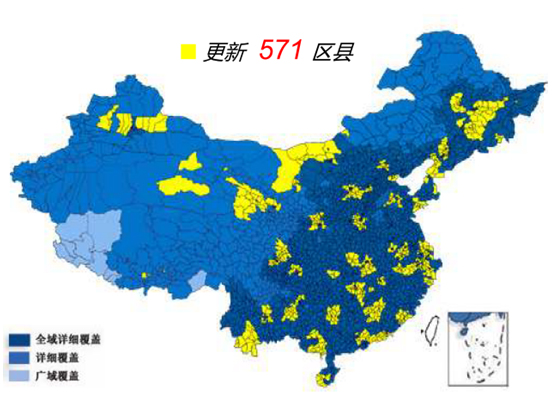
2013.20 main updates:
1, points of interest total more than 13.4 million .
2, the intersections nearly 3300 added( 3D junction pictures increased of nearly 300).
3, a significant increase in number of addresses 340,000 added.
4, two-dimensional landmarks representing an increase of 8%.
5, verify and repair of the past release version of the map following users' feedback.
infos:
FID 2193Code:Please Login or Register to see the links
Type 1 Nuvi300 Nuvi310 Nuvi600 Nuvi610 Originally Posted by ML-Garmin

Type2 Nuvi1255Code:Please Login or Register to see the links
Type 3 Nuvi1xxx 系列 Nuvi1320,Nuvi1350T,Nuvi1480C,Nuvi1375T,Nuvi1355,Nuvi1455,Nuvi1455plus,Nuvi1495TCode:Please Login or Register to see the links
Type 4 nüvi 255W Nuvi255Wplus Nuvi760 Nuvi765Code:Please Login or Register to see the links
Type 5 zumo660Code:Please Login or Register to see the links
Type 6 Montana 650Code:Please Login or Register to see the links
Type 7 nüvi 3790TCode:Please Login or Register to see the links
Type 8 nüvi 3750Code:Please Login or Register to see the links
Type 9 Nuvi200 Nuvi200W Nuvi206Code:Please Login or Register to see the links
Type 10 Nuvi205 Nuvi205W Nuvi255 Nuvi260Code:Please Login or Register to see the links
Type 11 Oregon450 Oregon550 Oregon550 Recreation GPSMAP78S GPSMAP62SCode:Please Login or Register to see the links
Type 12 eTrex 30 eTrex 30 Recreation eTrex 201 eTrex 301Code:Please Login or Register to see the links
Type 13 Rino650 GPSMAP62sc GPSMAP62sc Recreation GPSMAP621sc GPSMAP629scCode:Please Login or Register to see the links
Type 14 Nuvi2500 Nuvi2505Code:Please Login or Register to see the links
Code:Please Login or Register to see the links
Type 15 Nuvi C155 Nuvi C165 Nuvi C175Code:Please Login or Register to see the links
Type 16 Nuvi50Code:Please Login or Register to see the links
Type 17 Nuvi2500 Plus Nuvi2556 Nuvi2558Code:Please Login or Register to see the links
Type 18 Nuvi3560RCode:Please Login or Register to see the links
Code:Please Login or Register to see the links
Type 19 Nuvi2565R Nuvi2565R PlusCode:Please Login or Register to see the links
Type 20 Nuvi3560 Nuvi3590Code:Please Login or Register to see the links
Type 21 Nuvi2555Code:Please Login or Register to see the links
Type 22 Nuvi3790T VOLVO 专用Code:Please Login or Register to see the links
Thanks to a nice Noeman's friendCode:Please Login or Register to see the links
Last edited by Neil; 11th October 2013 at 10:07 PM. Reason: Add FID info.

You have to navigate to get to the good.
Galaxy S5 Kitkat 4.4.2 / Nuvi1200->1250 / Nuvi3790T->34xx / Nuvi 2200 / Nuvi 66 / Oregon 600
-
8th August 2013, 11:25 AM #2Important User
- Join Date
- Nov 2007
- Location
- light side
- Posts
- 15,182
- Rep Power
- 5128

You have to navigate to get to the good.
Galaxy S5 Kitkat 4.4.2 / Nuvi1200->1250 / Nuvi3790T->34xx / Nuvi 2200 / Nuvi 66 / Oregon 600
-
9th August 2013, 11:02 AM #3syzygyGuest
Major contents of each type.
Base Map Detailed Map POI Models Type1 World NT17 Small Nuvi 300, 310, 600, 610 Type2 2013.20 NT17-QSI+ISM Mid Nuvi 1255 Type3 2013.20 NT17-QSI+ISM Mid Nuvi 1320, 1350T, 1355, 1375T, 1455, 1480C, 1495T Type4 2013.20 NT17-QSI+ISM Small Nuvi 255W, 760, 765 Type5 2013.20+DEM NT17-QSI+ISM Mid Zumo 660 Type6 2011.10 NT17-QSI+ISM Mid Montana 650 Type7 2013.20+DEM NT17-QSI+ISM Mid Nuvi 3790T Type8 2013.20+DEM NT17-QSI+ISM Mid Nuvi 3750 Type9 World NT17-QSI+ISM Small Nuvi 200, 200W, 206 Type10 2013.20 NT17-QSI+ISM Small Nuvi 205, 205W, 255, 260W Type11 2013.20 NT17-QSI+ISM Nuvi 205, 205W, 255, 260W Type12 2013.20+DEM NT17-QSI+ISM eTrex 30, 201, 301 Type13 2011.10 NT17-QSI+ISM GPSMAP 62sc, 621sc, 629sc, Rino 650 Type14 2013.20+DEM NT17-QSI Mid Nuvi 2500, 2505 Type15 2013.20 NT17-QSI Mid Nuvi C155, C165, C175 Type16 2013.20 NT17-QSI Mid Nuvi 50 Type17 2013.20+DEM NT17-QSI Mid Nuvi 2500 Plus, 2556, 2558 Type18 2013.20+DEM NT17-QSI Big Nuvi 3560R Type19 2013.20+DEM NT17-QSI Mid Nuvi 2565R, 2565R Plus Type20 2013.20+DEM NT17-QSI Big Nuvi 3590 Type21 2013.20+DEM NT17-QSI Mid Nuvi 2555 Type22 2013.20+DEM NT17-QSI+ISM Mid Nuvi 3790T Volvo
-
9th August 2013, 11:11 AM #4syzygyGuest
Full list of Venus shift-corrected Maps and Camera POIs
[Only registered and activated users can see links. ] (including 2011.10. 2013.20, 2013.20+DEM, World)
[Only registered and activated users can see links. ] (No QSI - for Quick Spelling Input)
[Only registered and activated users can see links. ] (Including old format QSI)
[Only registered and activated users can see links. ] (including new format QSI)
[Only registered and activated users can see links. ]
-
27th August 2013, 07:32 PM #5Junior Member
- Join Date
- Jan 2013
- Location
- Malaysia
- Age
- 55
- Posts
- 7
- Rep Power
- 0
It mentioned shift corrected but I am still facing "offset/shifted". I am using Zumo 660. Any solution for that?
-
27th August 2013, 11:38 PM #6Important User
- Join Date
- Nov 2007
- Location
- light side
- Posts
- 15,182
- Rep Power
- 5128
-
28th August 2013, 02:30 AM #7syzygyGuest
Is your device a Garmin China model? How far is the shift? If it is less than 400 meters then most likely the shift is caused by bad reception of GPS signal. Originally Posted by klken88
-
28th August 2013, 04:56 AM #8Junior Member
- Join Date
- Dec 2010
- Location
- Surat thani
- Age
- 59
- Posts
- 3
- Rep Power
- 0
Is it possible to install this map and the 2012.20 English version on the same Sd card? I cannot get both to be recognised but individually they both work. My units are Thai nuvi 1250 & 40.
-
28th August 2013, 06:37 AM #9syzygyGuest
Yes. It is a common workaround for devices without built-in Chinese input support such as those bought in US and used in China. The English map is installed and unlocked but not selected which still enables search by English with PinYin. The Chinese map is installed, unlocked and selected to display the searched items for viewing, routing and other purposes. Originally Posted by wozgreen
Note that the two maps must not have the same version or FID.
-
28th August 2013, 07:59 AM #10Junior Member
- Join Date
- Dec 2010
- Location
- Surat thani
- Age
- 59
- Posts
- 3
- Rep Power
- 0
when i look at the Map Info on the device i can only get one map to display, depending on filename used its either English or Chinese but not together. Not sure where to check the FID of these 2 maps. Originally Posted by syzygy


Bookmarks