
 Likes:
 Reply With Quote
Gmapprom = 40.6 MB (42,668,032 bytes)
3D = 4.12 MB (4,329,472 bytes)
SGMYMAL.JCV (for 37xx) = 612 MB (641,833,918 bytes)
Welcome guest, is this your first visit? Click the "Create Account" button now to join.


Results 1 to 10 of 20
-
23rd May 2012, 03:11 PM #1Important User


- Join Date
- Nov 2007
- Location
- light side
- Posts
- 15,182
- Rep Power
- 5128
 Malsingmaps Malaysia/Singapore/Brunei NT 2012.10
Malsingmaps Malaysia/Singapore/Brunei NT 2012.10
Malsingmaps Malaysia/Singapore/Brunei NT 2012.10
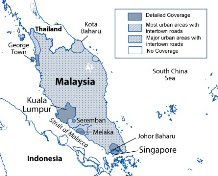

nüvi 3790/3790V
[hide][/hide]Code:Please Login or Register to see the links
nüvi 2575RLM / 2565LM / 2465LM / 2575R / 2565 / 2465
[hide][/hide]Code:Please Login or Register to see the links
nüvi 50LM / 40LM / 1460 / 1350 Series / 765 / 760 / 255W
[hide][/hide]Code:Please Login or Register to see the links
nüvi 1250
[hide][/hide]Code:Please Login or Register to see the links
nüvi 205 / 205W
[hide][/hide]Code:Please Login or Register to see the links
FID 451 ,locked .imgCode:Please Login or Register to see the links
Unpack the exe,( it's not a Mapsource install) the .img is in MapData folder, unlock as usual with
[Only registered and activated users can see links. ]
.JCV is in MapData/JCV .
You have to navigate to get to the good.
Galaxy S5 Kitkat 4.4.2 / Nuvi1200->1250 / Nuvi3790T->34xx / Nuvi 2200 / Nuvi 66 / Oregon 600
-
23rd May 2012, 03:19 PM #2aekhongGuest
-
24th May 2012, 06:26 AM #3aekhongGuest
Which model do you use to run this JCV ?
-
24th May 2012, 10:51 AM #4Important User
- Join Date
- Nov 2007
- Location
- light side
- Posts
- 15,182
- Rep Power
- 5128
Lol , it's not my screen, got it on Malsing forum

You have to navigate to get to the good.
Galaxy S5 Kitkat 4.4.2 / Nuvi1200->1250 / Nuvi3790T->34xx / Nuvi 2200 / Nuvi 66 / Oregon 600
-
25th May 2012, 08:01 AM #5Junior Member
- Join Date
- Mar 2012
- Location
- east
- Posts
- 2
- Rep Power
- 0
Hi, just a newbie here. I have an earlier version in my garmin device 1350. I want to put this new version in the the micro sd .Can this version co exist (without deleting the earlier version )although the map may be the same but just different version? I would appreciate a reply .Thanks a lot
-
25th May 2012, 08:55 AM #6Member +
- Join Date
- Dec 2007
- Location
- malaysia
- Posts
- 35
- Rep Power
- 31
When you install the program it will overwrite the previous JCV file.
Any reason you want to keep both versions?
-
25th May 2012, 09:18 AM #7aekhongGuest
@justme88
You should not use with the old one or your Nuvi may get malfunction.
@bearcat
You can preserve the old one if you manually put the map bundle.
Just right click on .exe file.
-
25th May 2012, 09:54 AM #8Junior Member
- Join Date
- Mar 2012
- Location
- east
- Posts
- 2
- Rep Power
- 0
Dear Bearcat and aekhong, Originally Posted by aekhong

Many thanks for your prompt reply and comment. I may have made a wrong assumption in that I am not able to upgrade the older version with this newer version (exe) file
in the garmin device as I don't have life map support . If I could install into the device and I would gladly do so as I have no reason to keep the old one.But what I did was as was stated by you to right click on the exe file and then unlock it by an unlocker prog .I then transfer manually to a sd . I was able to do that and on booting up the newer version is noted there . But below it show a faint image Map 1 and 2.( I am not able to see or touch map 1 and 2) That is why I asked earlier on that if I just leave the old version in the device but instead use the newer version on the sd whether it will give rise to problem next time. I don't want to go manually to delete the old version in the device as I am afraid to mess it up.
But now it seems that I could directly install it into the device (yet to try) then I will not use the sd route although I find the sd route to be easier.
Any comment will be appreciated.
Thank you once again.
-
22nd June 2012, 02:51 AM #9Member
- Join Date
- Aug 2009
- Location
- Earth
- Posts
- 19
- Rep Power
- 0
Does anyone know which version works with Garmin Mobile XT, or is the IMG file on all of them the same?
Last edited by gpsdudez; 22nd June 2012 at 02:55 AM.
-
22nd June 2012, 06:01 AM #10Master


- Join Date
- Oct 2008
- Location
- SA
- Posts
- 477
- Rep Power
- 425
You need version for nüvi 205 / 205W Originally Posted by gpsdudez
Enjoy life


Bookmarks