Welcome guest, is this your first visit? Click the "Create Account" button now to join.

Likes Likes:  0
Page 2 of 6 FirstFirst 1234 ... LastLast
Results 11 to 20 of 53

Hybrid View

  1. #1
    Junior Member
    Join Date
    Aug 2010
    Location
    Toronto
    Posts
    2
    Rep Power
    0

    Default

    Much Obliged - everything works - no offset. Perfect. The Pin Yin is a little more understandable over the chinese - especially as my unit does not write chinese characters.
    Thanx

    yea works fine. I put 006B082300.bin in the unit just in case , but I haven't tested whether it's critical to the operation. Also, remember to change the base map to the one provided.

    One strange occurrence - although the file sizes on the rar extract dir. read as per your sizes when they were extracted both the gmapsupp and gmapbap were noticeably smaller. However as stated everything works just fine.
    Last edited by catymag; 22nd August 2010 at 02:13 PM. Reason: merged- consecutive posts not allowed please edit instead thanks

  2.    Advertissements


  3. #2
    benjamin2100
    Guest

    Default

    Quote Originally Posted by redwhitemaps View Post
    Much Obliged - everything works - no offset. Perfect. The Pin Yin is a little more understandable over the chinese - especially as my unit does not write chinese characters.
    Thanx

    yea works fine. I put 006B082300.bin in the unit just in case , but I haven't tested whether it's critical to the operation. Also, remember to change the base map to the one provided.
    Hi, everything works fine for me except one thing. I can't seem to search for city names like "Shanghai". I can search for the Pin Yin such as "Shang" and it comes back with the Pin Yin such as "Shang Hai Shi, SHANGHAI" so it does recognize that it's a city. It's not a huge deal and I know the Pin Yin is similar to the English names, but just wondering if there's a way to make it work or am I doing something wrong?

    I don't know if this is related, but I installed the China base map (and China map) onto the SD Card. How and why would I switch my North American Basemap to the one provided....?

    Thanks!
    Nuvi 1350T

  4. #3
    liane333
    Guest

    Default

    Do I need to copy the basemap too or works it okay with CN map only?

    Best regards

  5. #4
    Junior Member
    Join Date
    Aug 2010
    Age
    49
    Posts
    5
    Rep Power
    0

    Default

    Quote Originally Posted by benjamin2100 View Post
    Hi, everything works fine for me except one thing. I can't seem to search for city names like "Shanghai". I can search for the Pin Yin such as "Shang" and it comes back with the Pin Yin such as "Shang Hai Shi, SHANGHAI" so it does recognize that it's a city. It's not a huge deal and I know the Pin Yin is similar to the English names, but just wondering if there's a way to make it work or am I doing something wrong?

    I don't know if this is related, but I installed the China base map (and China map) onto the SD Card. How and why would I switch my North American Basemap to the one provided....?

    Thanks!
    Nuvi 1350T
    Shang+Hai means is shanghai and Shi means is city.. 'shanghai city'


    How to install multiple maps on Garmin the easy way
    [Only registered and activated users can see links. ]

  6. #5
    Member
    Join Date
    Aug 2010
    Location
    China
    Age
    56
    Posts
    12
    Rep Power
    0

    Default

    thanks for the map. for a newby I downloaded, unlocked and successfully installed the map in my nuvi1455 and it works fine. Now I am wondering if there is a also lane assistance and JCV in this english (pinyin) map? Do they actually excist for an English map of China? When yes, pls help me download and install it.

    Thanks for replying!!

  7. #6
    Junior Member
    Join Date
    Aug 2010
    Location
    Panama
    Posts
    9
    Rep Power
    0

    Default

    I haven’t been able to get the link work for me, it is possible that somebody can send the jdownloader dlc container for this map?

    thanks,

  8. #7
    Important User Garmin China City Navigator NT ENG 2010.21 with Offsets Corrected
    Garmin China City Navigator NT ENG 2010.21 with Offsets CorrectedGarmin China City Navigator NT ENG 2010.21 with Offsets CorrectedGarmin China City Navigator NT ENG 2010.21 with Offsets CorrectedGarmin China City Navigator NT ENG 2010.21 with Offsets CorrectedGarmin China City Navigator NT ENG 2010.21 with Offsets CorrectedGarmin China City Navigator NT ENG 2010.21 with Offsets CorrectedGarmin China City Navigator NT ENG 2010.21 with Offsets Corrected
    catymag's Avatar
    Join Date
    Nov 2007
    Location
    light side
    Posts
    15,236
    Rep Power
    5124

    Default

    use Ballebar's links in post n 3
    l9ebnsm
    You have to navigate to get to the good.

    Galaxy S5 Kitkat 4.4.2 / Nuvi1200->1250 / Nuvi3790T->34xx / Nuvi 2200 / Nuvi 66 / Oregon 600

  9. #8
    Junior Member
    Join Date
    Aug 2010
    Age
    49
    Posts
    5
    Rep Power
    0

    Default

    1 more question.. when i download this file Part 1(4) 100 MB Part 2(4) 100 MB Part 3(4) 100 MB Part 4(4) 96 MB and extract all, .then need use garmin unlock generator.
    1) select map product "custom mapset"
    2) FID (or map ID) "2088"
    3) copy map unlock code and paste in "New Text Document and rename gmapsupp.unl"
    all is correct ? and ready can use? tomorrow i on back.. time to sleep.. good night all
    Last edited by ongcw8912; 2nd September 2010 at 03:14 PM. Reason: forget write something

  10. #9
    aekhong
    Guest

    Default

    Quote Originally Posted by ongcw8912 View Post
    1 more question.. when i download this file Part 1(4) 100 MB Part 2(4) 100 MB Part 3(4) 100 MB Part 4(4) 96 MB and extract all, .then need use garmin unlock generator.
    1) select map product "custom mapset"
    2) FID (or map ID) "2088"
    3) copy map unlock code and paste in "New Text Document and rename gmapsupp.unl"
    all is correct ? and ready can use? tomorrow i on back.. time to sleep.. good night all
    Almost done., You have to save as type "All Files".

  11. #10
    Junior Member
    Join Date
    Aug 2010
    Age
    49
    Posts
    5
    Rep Power
    0

    Default

    Quote Originally Posted by aekhong View Post
    Almost done., You have to save as type "All Files".
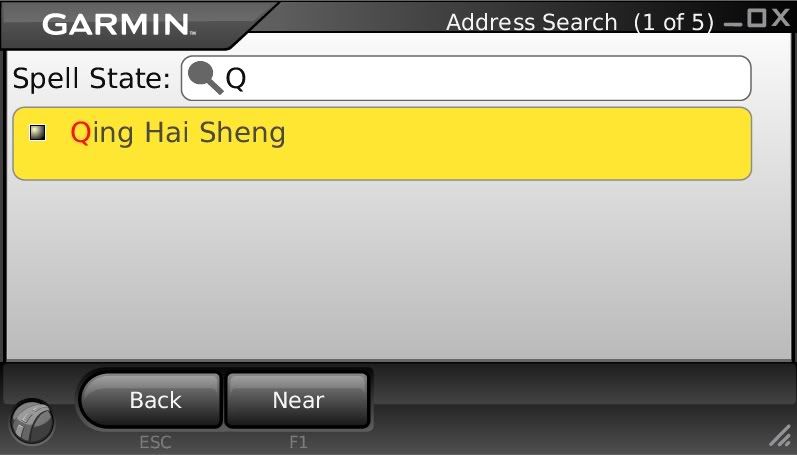
    yeah yeah... save as all files... but now the problem is.... i can preview china map already.. but why i cant find Qing Dao area????????? pls help me.. next month want going Qing Dao
    Last edited by ongcw8912; 3rd September 2010 at 02:07 PM.


Bookmarks

Posting Permissions

  • You may not post new threads
  • You may not post replies
  • You may not post attachments
  • You may not edit your posts
  •