
 Likes:
 Reply With Quote
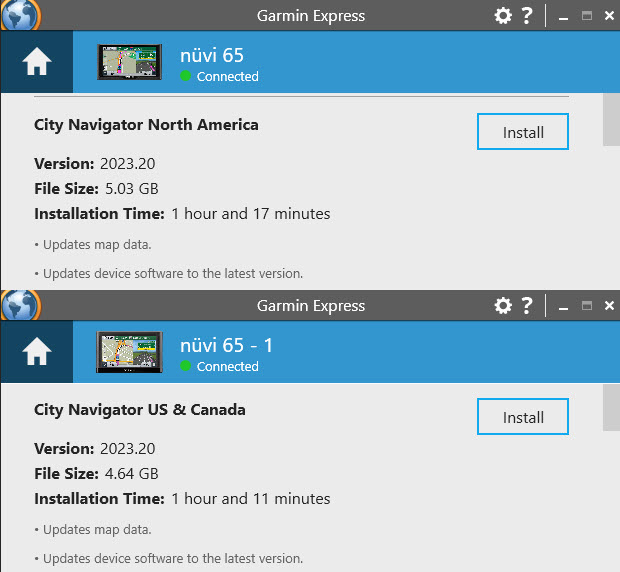
Your nuvi 65LMT's internal storage is no longer large enough to handle North America which has grown to a total of 4.11 GB without additional files.
Garmin Express would normally offer you to add an SD card ?.
Spoiler: image
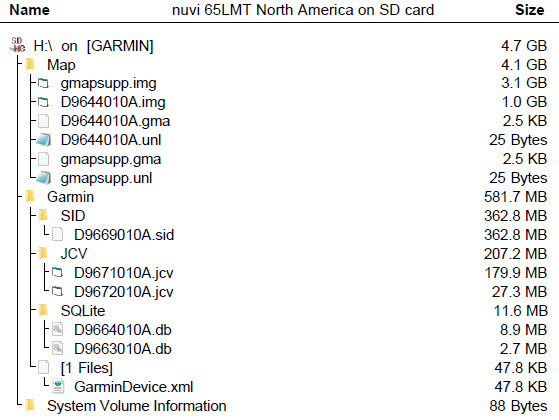
There is another way if Garmin Express didn't give that option, make a copy of your garmindevice.xml from your device and paste it to a folder called Garmin on a FAT 32 formatted SD card 16-32Gb. Without the device connected plug in the SD card to your PC (a clone of your device) and use Garmin Express to update it. Rearrange and rename the files as listed below. Insert SD card into nuvi 65
Spoiler: image
Welcome guest, is this your first visit? Click the "Create Account" button now to join.


Results 1 to 10 of 11
Thread: Nuvi 65LMT problems - SOLVED
-
19th January 2023, 11:40 PM #1Member +


- Join Date
- Mar 2013
- Location
- Southern Idaho
- Posts
- 41
- Rep Power
- 14
 Nuvi 65LMT problems - SOLVED
Hi, I just picked up a Nuvi 65LMT and was updating the maps and software. It asked me to choose a region to install. When I researched what they had install originally it said that North America was installed (Canada, USA, and Mexico). Is there some way to reinstall all of North America? I don't much need Mexico but could use Canada. Thanks, Jim
-
20th January 2023, 02:32 AM #2VIP Master




- Join Date
- Apr 2015
- Location
- On the move
- Posts
- 427
- Rep Power
- 1371

Last edited by Garman_Nuvi; 21st January 2023 at 04:26 AM. Reason: Updated to full image in spoiler
-
21st January 2023, 09:23 PM #3Member +
- Join Date
- Mar 2013
- Location
- Southern Idaho
- Posts
- 41
- Rep Power
- 14
I was able to get a copy of the US and Canada disc image file which I have stored on my computer. I copied it to an SD card into a directory names Garmin and it's not showing up. Do I need to rename it? Right now it's named gmapsupp. The other directory on the card is named maps and has a bunch of topo maps that do show up. The file is 2GB could this be installed directly on the Nuvi 65LMT replace the original file and if so how does one go about doing it. Jim
-
21st January 2023, 10:52 PM #4VIP Master
- Join Date
- Apr 2015
- Location
- On the move
- Posts
- 427
- Rep Power
- 1371
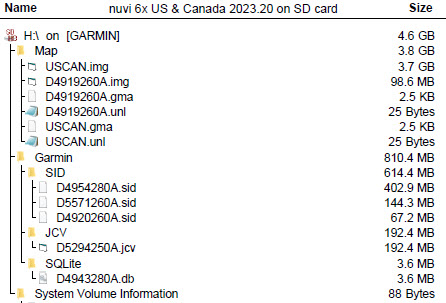
If you follow the instructions for cloning your device or you would have been successful. The Garmin .img file you backed up will not work without it's companion files .unl & .gma, would normally be renamed gmapsupp.img & go in the Map folder, but as you are using an SD card with existing maps rename it with a unique name USCAN.img for example.
Unusual that the folder on the SD card is Maps not Map ?
Spoiler: Supplimental maps location
You said you wanted N America so that's what I worked on. The US and Canada .img file is 3.72 GB, FourSquare 98.6 MB & the additional files 810Mb Total 4.61 GB (4,957,122,843 bytes)
Garmin Express would give you the option of selecting US and Canada & replacing what is on there if there was enough space.
These devices typically came out with a 4GB Storage capacity. <HardwareVersion>nuvi 65 C2p2 A V5 4GB 64MB DZ XT TI </HardwareVersion>
Spoiler: US & Canada on SD card
You had a similar situation a couple of years ago nuvi 55 & 65 are siblings
[Only registered and activated users can see links. ]Last edited by Garman_Nuvi; 22nd January 2023 at 01:44 AM.
-
22nd January 2023, 05:08 PM #5Member +
- Join Date
- Mar 2013
- Location
- Southern Idaho
- Posts
- 41
- Rep Power
- 14
I did copy the gmapsupp img (US & Canada West 2GB size) a disc img file to the SD card and put into the Maps folder and renamed it gpsmapsupp 2. It now shows up on my GPS and I was able to find and address in Vancouver, BC as a test. I'm not quite understanding how to edit the xml file. Ok I plug the GPS into my computer copy the file to an SD card. In your tutorial it shows USCAN.img as being 3.8 GB. The file I'm using is 2 GB and a disc img file. Is this the file I need to use? Once I edit the files can they be put back into the GPS bypassing the SD card? Is the D4919260A.img file at 98.6 MB the FourSquare file. I assume that I need to use some kind of XML file editor. One more question if I'm using Garmin Express how would I access the saved disc img file that I have on my computer (US & Canada West 2 GB) should fit or can I do it through Homeport or Basecamp although Basecamp don't recognize the Nuvi 65. Jim
Last edited by Seabee; 22nd January 2023 at 05:35 PM.
-
22nd January 2023, 10:59 PM #6VIP Master
- Join Date
- Apr 2015
- Location
- On the move
- Posts
- 427
- Rep Power
- 1371
There is no editing of the garmindevice.xml ,only copying it to a folder called Garmin on an SD card that has more space than your device has 8Gb>,un plug your nuvi 65 from your PC then plug the SD card into your PC directly/SD card reader (NOT in your nuvi 65) then Garmin Express will see there is enough space available now and offer to update with what ever your original Life Time subscription is for.
All the files will be installed on the SD card, all you have to do is rearrange & rename them as above.
Plug your SD card into your device ,you should then have fuller coverage.
Edit:
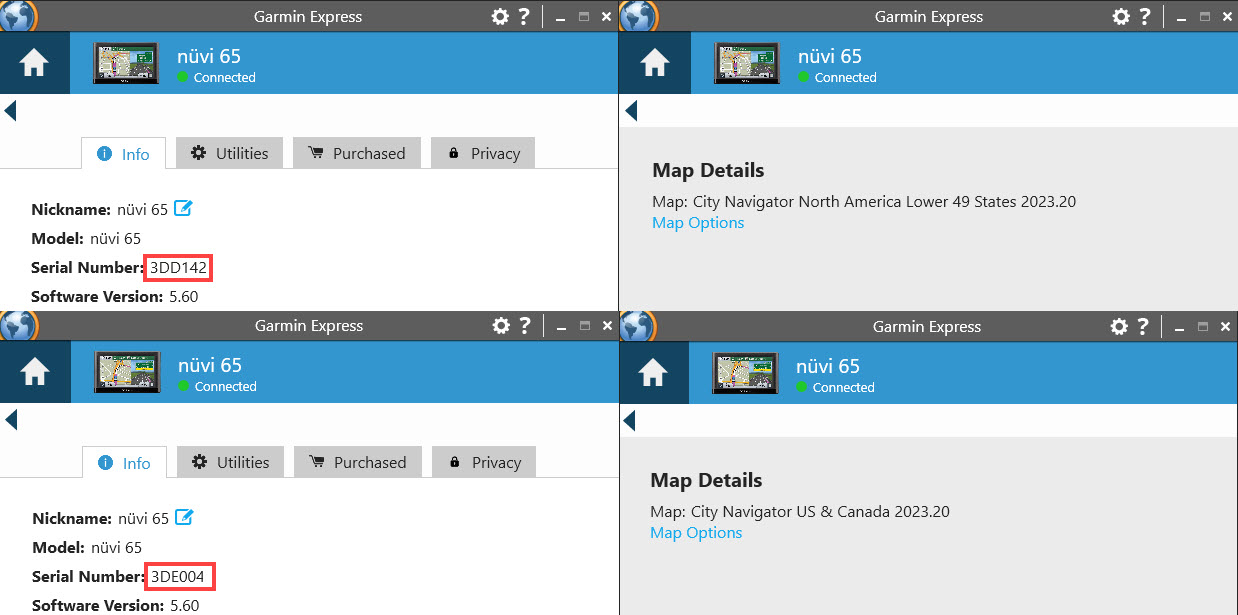
Sorry to tell you but this device with the serial number prefix 3DD only has a subscription for Lower 49 States, I've check with other with the same prefix.
Spoiler: nuvi 65 by serial number showing Lower 49Last edited by Boki; 23rd January 2023 at 07:38 PM. Reason: unnecessary quote removed
-
24th January 2023, 10:11 PM #7Member +
- Join Date
- Mar 2013
- Location
- Southern Idaho
- Posts
- 41
- Rep Power
- 14
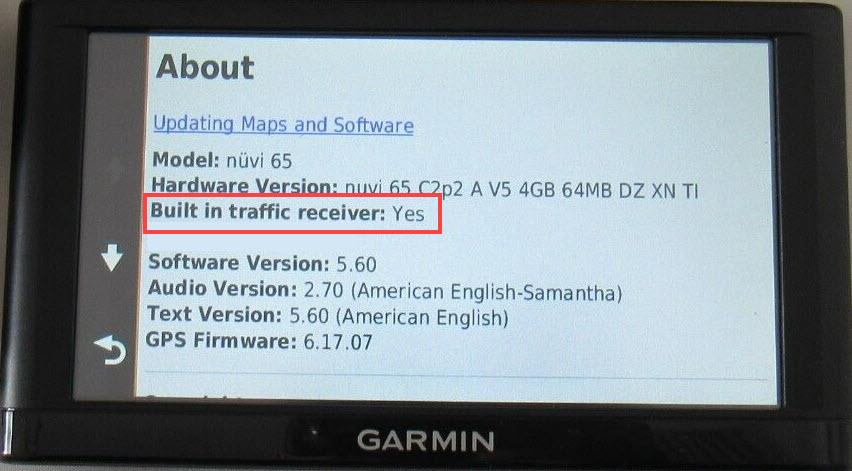
Well I got the map problem semi sorted out. Not perfect but I can live with it. New glitch now. I'm getting the message "this accessory not supported" now. I reset the GPS back to factory settings. The traffic receiver I used is a GTM 60. I also tried a GTM 39. Still got the same message. There are not traffic broadcasts here in the local area so I don't know if that's the problem or not. My other Garmins don't give the message when using the same receiver cables. Jim
-
25th January 2023, 09:02 AM #8VIP Master
- Join Date
- Apr 2015
- Location
- On the move
- Posts
- 427
- Rep Power
- 1371
Last edited by Garman_Nuvi; 25th January 2023 at 09:05 AM.
-
25th January 2023, 04:50 PM #9Member +
- Join Date
- Mar 2013
- Location
- Southern Idaho
- Posts
- 41
- Rep Power
- 14
I'll give it a try as I do have a GTM 20. I was thinking that it took the GTM 60. Jim
-
25th January 2023, 10:46 PM #10VIP Master
- Join Date
- Apr 2015
- Location
- On the move
- Posts
- 427
- Rep Power
- 1371
Not GTM 20 which incudes the receiver, but TA 20 (Blue LED) this provides Power & the antenna using the embedded traffic receiver in the device
Last edited by Garman_Nuvi; 25th January 2023 at 10:49 PM.


Bookmarks