
 Likes:
 Reply With Quote
You can enter Mass Storage mode. Update everything with webupdate. But you restart it and nothing happens.
Puede entrar en modo Mass Storage. Actualice Todo con webupdate. Pero lo reinicias y no pasa nada.
I try to load the nuvi8xx_regionfileonly__470.rgn with the Updater.exe and it tells me there is NO AVAILABLE UPDATE
Trato de cargar el nuvi8xx_regionfileonly__470.rgn con el Updater.exe y me dice que NO HAY ACTUALIZACIÓN DISPONIBLE
Welcome guest, is this your first visit? Click the "Create Account" button now to join.


Results 11 to 18 of 18
-
6th July 2018, 10:48 AM #11Important User


- Join Date
- Jul 2017
- Location
- CA
- Posts
- 1,466
- Rep Power
- 1060

@byedus
Holding the power button down continuously for an extended time or removing the battery will always power-down a frozen garmin device. Clearly you've now got it to power off as you've got it into pre-boot mode. Read the posts above regading the problems recovering bricked 8xx Linux-based devices, in short there is no cure3 firmware available. If you have an idea of which particular file (*.img; *gpi; *.vpm etc) 'bricked' it and can modify Linux software you may be able to exclude that file type from loading so you can get Mass Storage Mode back. Or try re-flashing current firmware in pre-boot if you think that it's a recent firmware update that is the problem, see Post #6 & #8 above for more.
-
8th July 2018, 01:31 AM #12Member +


- Join Date
- Apr 2009
- Location
- ARGENTINA
- Age
- 56
- Posts
- 62
- Rep Power
- 0
-
8th July 2018, 04:56 AM #13Important User
- Join Date
- Jul 2017
- Location
- CA
- Posts
- 1,466
- Rep Power
- 1060
Some history of exactly what occurred before the device bricked might be helpful. Information such as if you updated it with new files, or the latest firmware, or both will help.
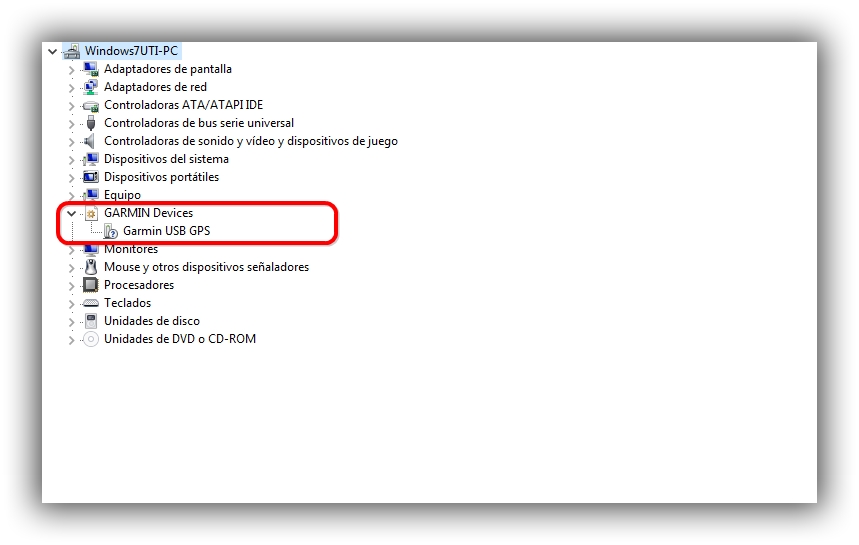
Are you sure that it can access Mass Storage Mode? Having MSM available means you can remove any files suspected of being corrupt to see if it can then boot. However WebUpdater can see devices connected to PC in either Mass Starage Mode and pre-boot mode so it may only be that the device has defaulted to pre-boot mode because of faulty firmware. You can check when it's connected to the PC whether it's in pre-boot or MSM by checking in Device Manager. If it's connected in MSM it should show under 'Disk Drives' in Device Manager, show in Disk Management and can be browsed. If it's in pre-boot mode it will not show in Disk Management, cannot be browsed but will show separately as a Garmin Device in the main list of Device Manager, like this:
[Only registered and activated users can see links. ]
At least, that's how a 'normal' nuvi shows.I have a nuvi 5000 which is also a Linux-OS device and it shows a little differently to a Garmin prorietary-OS device. Remember telling EVERYTHING you know about what has happened before may be very important to restoring your 885.
-
9th July 2018, 05:16 PM #14Member +
- Join Date
- Apr 2009
- Location
- ARGENTINA
- Age
- 56
- Posts
- 62
- Rep Power
- 0
I already have an 885 run and this one I bought like this. I thought it would be easy to fix it.
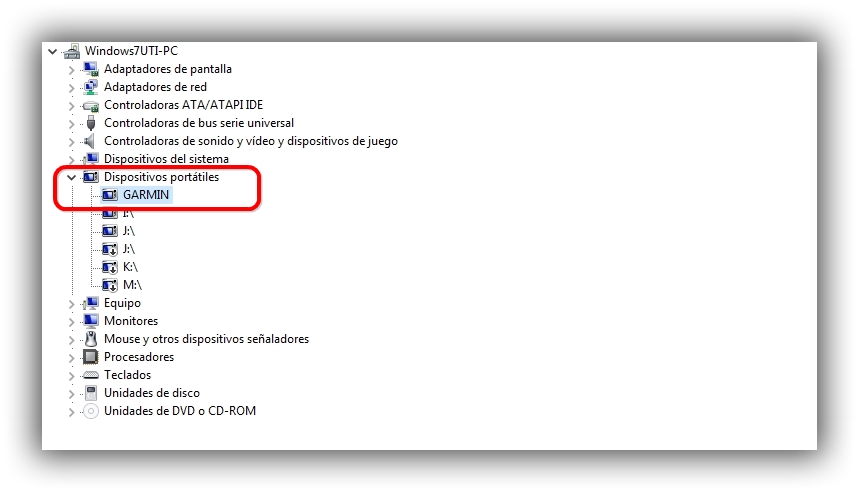
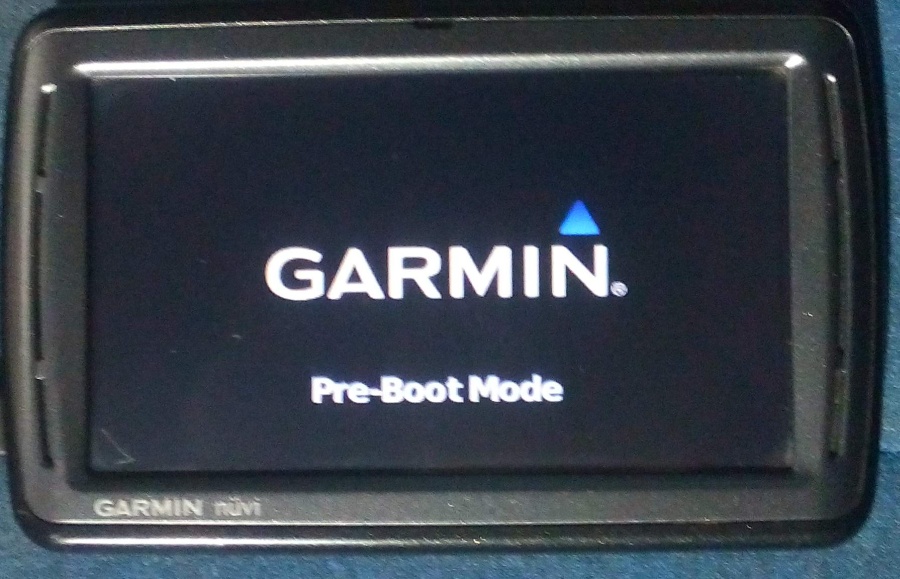
When connecting to the PC it takes about 2 to 3 minutes to enter MSM mode.
I pass you video and capture ...
Last edited by byedus; 9th July 2018 at 05:33 PM.
-
10th July 2018, 01:54 AM #15Important User
- Join Date
- Jul 2017
- Location
- CA
- Posts
- 1,466
- Rep Power
- 1060
Your video is showing as unavailable to me. So, I'm guessing that the device starts showing "Pre-boot mode" on the screen before eventually, without any action by you, moving to Mass Storage Mode where the grey PC icon is shown?
The fact that it eventually shows in Portable Devices (Dispoitivos portatiles) means of course that it has now attained Mass Storage Mode, so it should also show in Disk Drives (Unidades de disco) and in the 'safely eject media' menu of the notification area of your taskbar. This is my Garmin 5000 Linux device in MSM:
[Only registered and activated users can see links. ]
Now, if it has in fact got full MSM state you should be able to browse the file system. You can try this: Remove everything from the file system to a folder on your PC. Create a folder named 'Garmin' in the root of the nuvi, safely remove it from the PC and see if it will boot empty as it might be a faulty file causing the problem. If that doesn't work, try the following:
Put the original files and folders back in the nuvi, but not the file *.update which is in Garmin\Update folder (keep a backup of it). Mine is named "B074300.update" in my nuvi 5000 as shown below, your nuvi 885 has probably got the name "B072600.update". Then open the file named "GarminDevice.xml" in NotePad, search for this <SoftwareVersion>470</SoftwareVersion>and change "470" to "460", save the change then leave the nuvi connected to the PC.
[Only registered and activated users can see links. ]
Drag a new fresh Version 4.70 "[Only registered and activated users can see links. ]" file onto WebUpdater icon on your desktop, it will load the fresh file to the nuvi. Safely remove the device then try to boot it. It might work if the problem is due to a faulty firmware.
-
16th July 2018, 11:00 PM #16Member +
- Join Date
- Apr 2009
- Location
- ARGENTINA
- Age
- 56
- Posts
- 62
- Rep Power
- 0
Copy files from another 885 run to the latter, and nothing.
Install the file "nuvi8xx_regionfileonly__470.RGN" with the WEBUDATE. Disconnected from the PC. and it stays in the GARMIN LOGO and it does not happen there.
I can not get it back.
Copie archivos de otro 885 funcionado a este ultimo, y nada.
Instale el archivo "nuvi8xx_regionfileonly__470.RGN" con el WEBUDATE. Desconecto del PC. y se queda en el LOGO de GARMIN y no pasa de ahi.
No puedo recuperarlo.Last edited by byedus; 16th July 2018 at 11:04 PM.
-
19th July 2018, 05:51 PM #17Master


- Join Date
- Aug 2009
- Location
- Belgium
- Age
- 78
- Posts
- 2,179
- Rep Power
- 1289
Could it be that you are missing gmapprom.img file in the memory of the Garmin Nuvi 855.
I have run into a user that did strange things by deleting the gmapprom.img and nothing would work again.
They could not see the all Garmin folders on their PC.
By using a file brower called XYplorer it can see all the folders on a nuvi.
It is far better than File Explorer for lots of things.
You can download a trial version of it.
by seeing that the gmapprom.img was missing he was able to copy over a version of it.
restarted the nuvi and it was up and running again.
-
23rd July 2018, 12:29 AM #18Member +
- Join Date
- Apr 2009
- Location
- ARGENTINA
- Age
- 56
- Posts
- 62
- Rep Power
- 0
With gmapprom.img it does not work either.
Con el gmapprom.img tampoco funciona.


Bookmarks