Welcome guest, is this your first visit? Click the "Create Account" button now to join.



 Likes:
Results 111 to 120 of 133
-
8th March 2014, 07:51 AM #111Member


- Join Date
- Aug 2013
- Location
- A
- Posts
- 24
- Rep Power
- 71

Thanks for accepting the naming idea!
More feedback:
*LBL; NET; NOD are OK!
*In RGN you forget to adjust the offset at x55
in the example it says x52f it should go x208, as you correctly did in the other offsets in RGN, the rest is OK.
*TRE is OK also, there are differences because you change the copyright info for a custom one, but all offsets point to where they should, so NO problem.
Another idea: perhaps you could put there your name and version, instead of garbage, like: r0cker V2.00 or something...or the option to keep the original copyright info (this probably would need more programming as copyright info change between map compilers, like mapear or carteblanche)
thanks
-
15th March 2014, 07:31 PM #112Junior Member
- Join Date
- May 2013
- Location
- st-arsene
- Posts
- 3
- Rep Power
- 0
-
16th March 2014, 10:07 AM #113Member
- Join Date
- Aug 2013
- Location
- A
- Posts
- 24
- Rep Power
- 71
Checked.
Excellent!!! working perfect.
Tested with a real pseudo-nt map from mapear.
1-Using your extractor version 3,
2-then joining the files with GMapTool as a non-nt img (short header in options),
3-then opening it with GPSMapEdit and saving as a *.mp format without any problem or error.
all working perfect.
same result as the "manual extraction", EXACTLY the same output as a *.mp map in both cases.
-
19th March 2014, 05:12 AM #114Member
- Join Date
- Aug 2013
- Location
- A
- Posts
- 24
- Rep Power
- 71
Hi Neil
Could you test this map in your garmin NT-unaware device as you did before?
[Only registered and activated users can see links. ]
The map is converted to non-NT from a pseudo-NT original.([Only registered and activated users can see links. ] you can download also the pseudo-nt original to confirm, just in case, that indeed it is not working)
BUT it is compiled with GMapTool enabling 'Short header' option.
please check if it works now.
thanksLast edited by testlelelala; 19th March 2014 at 05:30 AM.
-
19th March 2014, 10:00 AM #115Garmin/GPS Systems GMod.


- Join Date
- Aug 2011
- Location
- Oz.
- Posts
- 6,797
- Rep Power
- 2568
G'day testlelelala & r0cker
Test done, nice work. You should take a bow and have the rest of the day off, relax with a beer or 10 and charge them to Giomen.
test_original.img renamed gmapsupp.img has it's Map Name ZONA 1 read in StreetPilot 2610 Map Information display info screen following boot, but no details in Map Info of Menu and of course no detail map shown on screen, only base map as expected.
test.img as gmapsupp.img is read normally:
Spoiler: pic
Routed normally [as far as i can tell] on a 20.2 km simulated route Buenos Aires to San Fernando.
Congratulations.
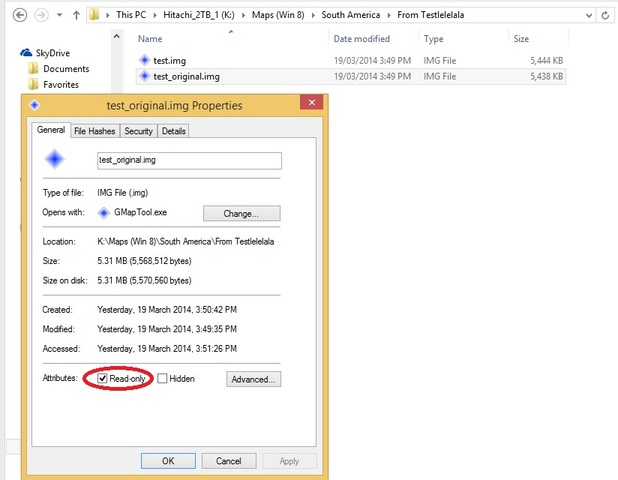
PS: Did you make test_original.img 'Read Only' intentionally?'Thanking Posts' are banned. To thank someone, and/or to see hidden links and content, use the [Only registered and activated users can see links. ] button below left of the helpful post then refresh your browser [F5 key]. 'Thanking Posts' are banned.
Please don't spam. Posts serving no purpose other than to thank or to ask about hidden links are trashed or deleted, it's GPSPower's policy under [Only registered and activated users can see links. ]. Please don't spam.
[Only registered and activated users can see links. ] should make their first post as a new Intro Thread in [Only registered and activated users can see links. ].
-
19th March 2014, 06:34 PM #116Member
- Join Date
- Aug 2013
- Location
- A
- Posts
- 24
- Rep Power
- 71
oh great!!! So at least pseudo-NT maps can be converted to regular/old non-NT maps readable even in old garmin units.
Ps: what do you mean with 'read only'? Nevertheless the answer is NO, as i didn't do anything to the test_original.img, it is an original not compiled by me, i didn't touch that map.
-
19th March 2014, 10:53 PM #117Garmin/GPS Systems GMod.
- Join Date
- Aug 2011
- Location
- Oz.
- Posts
- 6,797
- Rep Power
- 2568
It's of absolutely no consequence, merely my innate insatiable curiosity. I meant read only attribute is checked in windows properties is all. Sorry for the 'red herring':
Spoiler: pic
PS: I found it was read only because i wanted to check both images in BaseCamp before using in the SP but test_original.img wasn't visible because of MS flag '1'. ImgTool showed it as 'read only' when i opened it to change the flag.'Thanking Posts' are banned. To thank someone, and/or to see hidden links and content, use the [Only registered and activated users can see links. ] button below left of the helpful post then refresh your browser [F5 key]. 'Thanking Posts' are banned.
Please don't spam. Posts serving no purpose other than to thank or to ask about hidden links are trashed or deleted, it's GPSPower's policy under [Only registered and activated users can see links. ]. Please don't spam.
[Only registered and activated users can see links. ] should make their first post as a new Intro Thread in [Only registered and activated users can see links. ].
-
15th December 2014, 11:05 PM #118Junior Member

- Join Date
- Nov 2013
- Location
- Montana
- Posts
- 5
- Rep Power
- 0
Has anybody had luck opening an unlocked NT format img with GME 2.1.78.8?
-
17th December 2014, 02:54 AM #119Member
- Join Date
- Jun 2011
- Location
- tHAI
- Posts
- 20
- Rep Power
- 0
Extact from GarminGMPExtract003.zip always 0 Byte(with WinRAR,PowerArchiver,7zip). Any idea?
-
17th December 2014, 03:32 AM #120Important User


- Join Date
- Nov 2007
- Location
- light side
- Posts
- 15,182
- Rep Power
- 5127

 Reply With Quote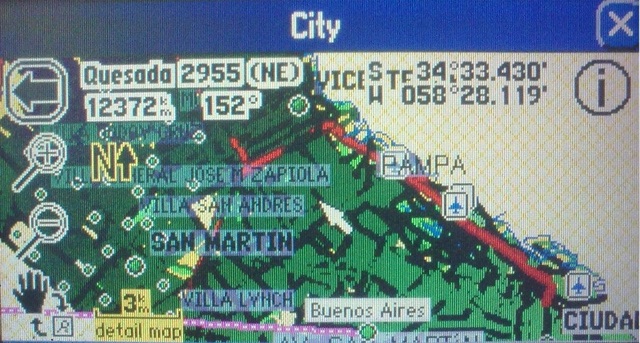


Bookmarks